Next Reign: Kingdom demo to 1.0
April–August 2026 demo history, the v0.3 book UI, save transfer, and what to do first after import.
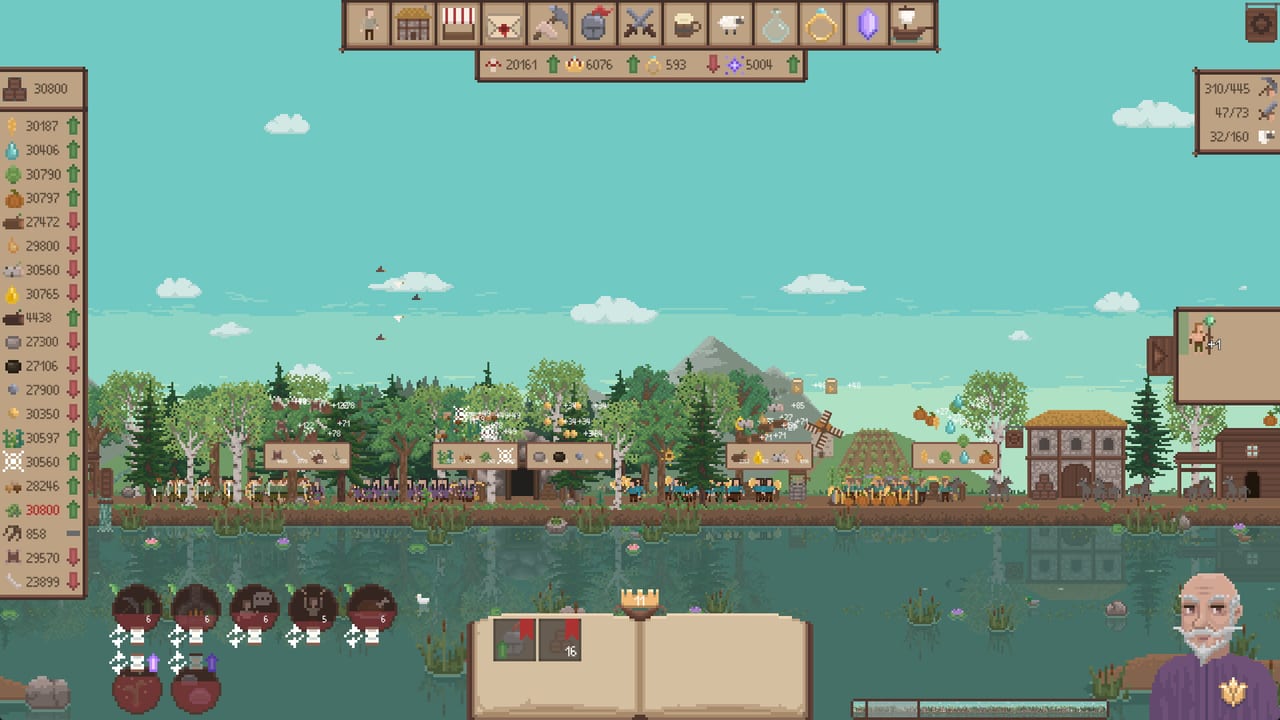
If you spent the spring and summer in the Next Reign: Kingdom demo, 1.0 is not a new hobby. It is the same settlement with the rest of the campaign bolted on. Tiny Tulip Games said demo progress can transfer into the full game. This page is the history of that demo, the August 21 v0.3 UI you may already be running, and a first-hour plan once Steam app 4536900 loads the file. It is not a replacement for getting started or prestige. Those two guides are what you open after the save actually appears.
Demo timeline, April to August 2026
The demo (Steam app 4580490) went live on April 11, 2026. That build taught the loop: hold left-click on the wheat field, hire farmers before you decorate, push wood and stone, then taste iron, tools, and a first prestige. Creators spent long sessions in it through May and June. The itch.io page at tinytulipgames.itch.io/next-reign-kingdom hosted Windows and Linux downloads during that period; Steam is the 1.0 storefront Tiny Tulip pointed to on September 3.
On July 22, 2026, the studio named the release time: September 3, 2026, at 10:00 AM PDT / 7:00 PM CEST. The same post promised more demo UI and tutorial polish before ship, then a later demo pass to line quality up with 1.0, and it stated that you would be able to transfer demo progress into the full game if you wanted to. That transfer sentence is why this page exists. We are not inventing a hidden importer. We are repeating what Tiny Tulip posted, then telling you how to play once the file is in 1.0.
On Friday, August 21, 2026, demo v0.3 landed as the last big free update. The Steam post called it the release demo. If you launched the demo after that date, you already have most of the HUD 1.0 buyers see. If your last session was May, the book, the resource filter, and the consultant will feel new even on an imported save.
What v0.3 actually changed
Tiny Tulip did not dump a fifty-line changelog. The studio highlighted three clusters.
Fresh UI. The bottom box that used to show bookmarks and mixed info became an open book. The book is for bookmarks, not a second resource sheet. Low-stock and depleting-resource overview moved to the left resource panel. Hover that panel and it expands with a button that filters to resources that are draining or already thin. UI scaling went up so less of the world hides behind chrome. The bottom-right box became the consultant, with a visual pass and more interactive tutorial beats, including army setup.
Better quest and army flow. The new scale cut some of the tabbing that used to sit between you and a fight. Formation setup got an interactive tutorial. Formations persist between prestiges, so a reset no longer throws away the line you just learned to draw. Empty space on the army board fills as you unlock options; you are meant to plan moves the way you would while watching the units’ backs.
If you last played before v0.3, do not hunt the old bottom bookmark strip. Open the book. Hover the left panel when a stockpile turns ugly. Let the consultant finish a prompt before you click past it; the interactive army tutorial is the one that used to feel like homework.
Save transfer, as stated
Tiny Tulip said you can transfer demo progress into the full game. Launch 1.0 from Steam, confirm the imported reign is the settlement you remember, and only then spend prestige points. If the file does not appear, use Steam discussions or tinytulipgamesstudio@gmail.com with the demo app ID (4580490) and the 1.0 app ID (4536900). This wiki does not have a private Discord invite to send you to, and we will not invent one.
Transfer is optional. Starting a fresh 1.0 reign is valid if you want the twenty-hour pitch from a clean field. Importing is for players who already earned early prestige nodes and do not want to re-click the same wheat. Either way, 1.0 is larger than the demo: the store still advertises around twenty hours, 100+ prestige upgrades, and five unit types. Your demo hours were a slice of that, not the cap.
First things to do in 1.0 after import
Do not hand the crown in the first five minutes just because the button is glowing. Imported progress is a head start, not a reason to skip the new HUD.
- Confirm the book and the left panel. Place one bookmark in the book and hover the resource list until the depleting filter appears. If those two controls work, you are on the v0.3-class UI.
- Re-read the first-hour order even if you think you know it. Getting started still applies: houses and farmers before pretty walls, then lumberjacks and stone, then the iron chain. An imported save can still be wheat-starved if you spent the demo decorating.
- Audit production before combat. If coal, iron ore, bars, or tools are the red row, fix that before you recruit a full front line. Glory and monster remains matter, but a stalled smelter stalls the next prestige too.
- Open the prestige tree with a plan. Prestige is the page for that. Formations now survive a reset, so you are not throwing away army homework, but you are still wiping the reign’s stockpiles. Spend points on the bottlenecks you actually felt in the demo, not on every shiny node.
- Only then push content the demo barely showed. Five unit types and the later production toys are the 1.0 widening. Treat them as new systems, not as demo leftovers you already mastered.
If the imported file feels worse than your last demo session, you probably skipped step 1 or 2. The book and the filter exist because the old bottom box hid information. Use them before you assume 1.0 nerfed your farmers.
Demo versus itch versus Steam
Steam 1.0 is the build this wiki documents. The Steam demo page is how most people found the game in 2026. The itch.io page may still read like an in-development listing; that page lagged the Steam news. If you have an itch unzip from April, prefer the Steam copy for transfer and for patches. Tiny Tulip’s official trailer still lives on the TinyTulipGames channel if you want a reminder of the loop you already played.
Linux players who imported a save should still treat the Ubuntu 24.04 / RX 580 menu-scroll crash as a launch-week report, not as a guaranteed bug. If a menu reload wipes a session, write it up on Steam discussions with hardware notes. The launch notes keep that caveat next to price and platforms.
Once the file is stable, leave this news page. Getting started is the first-hour checklist. Prestige is the reset checklist. The rest of the campaign is why you paid $4.99 (or $3.99 through September 10, 2026).
Frequently Asked Questions
Quick answers for new rulers and returning prestige runners.
When did the Next Reign: Kingdom demo come out?
April 11, 2026, as Steam app 4580490. v0.3 on August 21 was the last big demo UI pass before the September 3 1.0. See the timeline above, then the launch notes for ship day.
What should I relearn if I last played before v0.3?
The open book replaced the bottom bookmark box, and the left resource panel now filters depleting or low stock on hover. After that, follow getting started even on an imported save.
Does demo progress really transfer?
Tiny Tulip said it can. Launch 1.0 and confirm the reign. If it is missing, use Steam discussions or the studio email, then continue from getting started.
Should I prestige the moment 1.0 loads my demo save?
No. Formations persist, but the reign still resets. Read the prestige guide and spend points on the bottlenecks you actually felt.
Is the itch.io build the same as Steam 1.0?
Steam is the 1.0 storefront. Use itch only as a historical demo host. After import, play from Steam and follow prestige when you are ready to hand the crown.
Where do I go after the save looks correct?
Getting started for the first hour, prestige before a reset, and the updates hub if you are checking for later patches.