Next Reign: Kingdom Controls and HUD
Every click, key, and panel you actually use while the village runs.
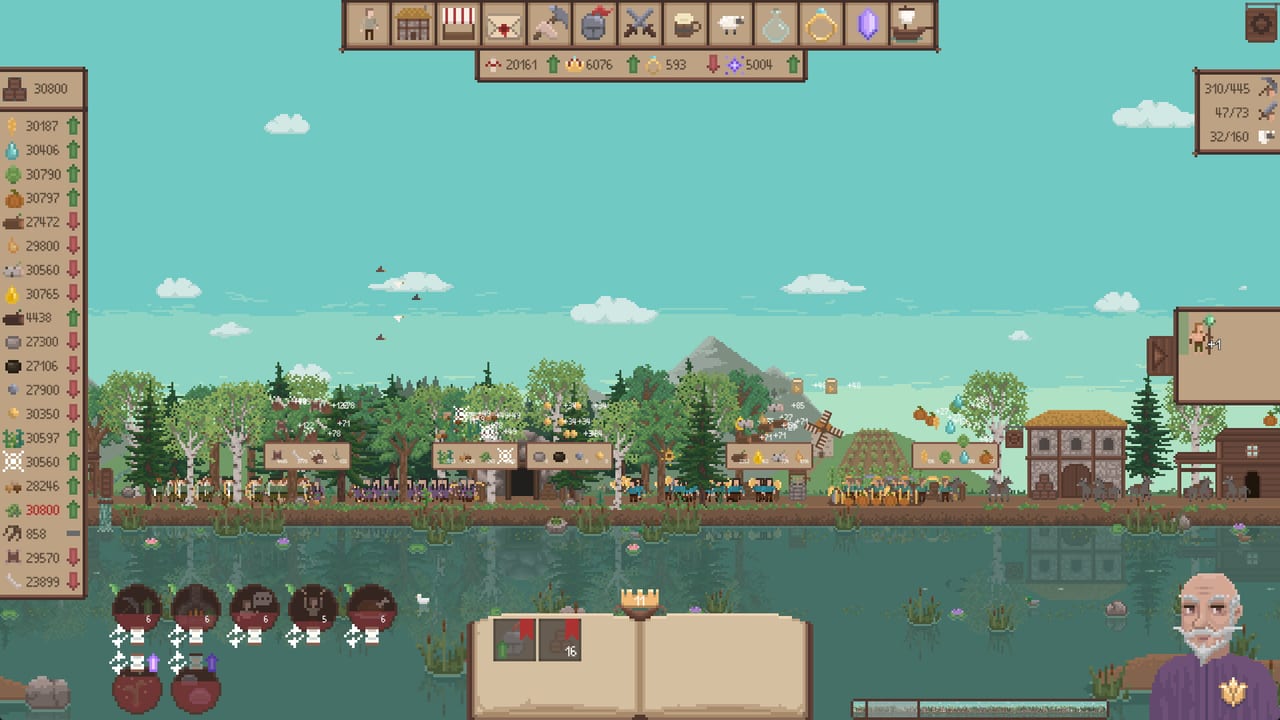
Next Reign: Kingdom is a mouse-and-keyboard incremental. There is no gamepad scheme in the launch build, and there is no second player to hand a stick to. Tiny Tulip Games built a side-scrolling pixel kingdom you steer from a dense HUD. If the first hour feels slow, it is usually because the camera, the left resource list, and the top tabs are fighting you. This page is the anatomy chart. Pair it with the first-hour settlement checklist while wheat is still the only number that matters.
Camera and world clicks
The settlement is a side-on strip, closer to The Settlers 4 than to a top-down city builder. You do not click-drag a box of units around a fogged map. You pan, you click nodes, and you hire from menus.
| Input | What it does |
|---|---|
| Hold left-click on wheat or a similar node | Gather that resource by hand |
| Right-click and drag | Pan the camera |
| A / D | Pan left and right |
| Shift + A / D | Faster pan |
| Bottom-left bar | Minimap with a cursor you can use to jump |
Manual gathering is not a gimmick. Early wheat, and later nodes that behave the same way, respond to a held left-click. The moment farmers exist, you can let go. Until then, the click is your first production building. Do not spam click. Hold.
The minimap lives in the bottom left. It is small on purpose. Use it when the castle, docks, or a fight slide off the pixel strip. Right-click drag is smoother for short adjustments; A/D plus Shift is faster when you know you need the other end of the town.
Left resource list
The left column is the truth of the run. Each resource shows a stock and a green or red arrow. Green means the pile is growing. Red means it is shrinking. Wheat, wood, and stone sit there from the opening. Favor, water, glory, monster remains, hops, beer, livestock, magic crystals, and potions join as systems unlock. Iron ore, coal, iron bars, and tools appear when the wheat-to-tools production chains come online.
Hover the left panel. In the launch UI it expands. A filter then shows resources that are depleting or low on stock. That filter replaced the old bottom info dump. If a number is red and you cannot see why, expand the panel before you build another house. A red wheat arrow while hiring is normal. A red wood arrow while three construction buttons are queued is a stall waiting to happen.
Pin or watch the resources you are currently converting. Coal and iron ore both going green while bars stay flat means the smelter is missing. Bars going green while tools stay flat means the smithy is missing. The left list will tell you that before a quest text does.
Top category tabs
The top of the screen is where you hire and build. Tabs group farmers, lumberjacks, miners, houses, warehouses, military, and later specialist buildings. Open a tab, hover a button, read the cost, click to buy. Costs come out of the left list immediately. There is no separate wallet.
The same tabs hold in-reign upgrades: extra collection, extra space, extra damage. Those upgrades reset with the reign unless a prestige node says otherwise. Prestige upgrades live under the crown, not under the hire tab. Mixing those two up is how people spend a reign’s wood on a bonus they were about to throw away.
When a tab is full of buttons you always press, bookmark them. That is what F and G are for.
The book, the crown, and bookmarks
Demo v0.3 on August 21, 2026 replaced the old bottom information box with an open book. The launch HUD keeps that book. It is not flavor art. Bookmarks and the compact status you used to hunt in a strip now live there. The prestige crown sits over the book. Handing the crown starts the next generation. Read How to hand the crown before you click it. The book is a dashboard; the crown is a reset.
| Key | Context | Result |
|---|---|---|
| F | Hover a hire button, building, or upgrade | Create a bookmark visible with the book |
| G | Hover the same kind of button | Create a prioritize bookmark |
Hover first, then tap the key. F is the reminder. G is the “do this, not that” marker when several automated sinks compete. Prestige can unlock bookmark creation if it is still gated on a fresh profile. Once you have it, bookmark farmers, the warehouse, the market trade you care about, and the combat quest you are actually running. Do not bookmark every button. The book is a short list on purpose.
A later hotfix before launch added a sound when you bookmark or when you toggle progression recommendations by clicking the consultant. If you hear the cue, the bookmark took. If you do not, you were not hovering a valid button.
Advisor, combat panel, and formations
The bald king in purple is the advisor, also called the consultant in patch notes. Click him for contextual tutorial beats instead of a wall of scroll text. He is not a hero unit. He will talk about markets, warehouses, combat, and prestige as those systems unlock. If a prompt feels dense, click him again rather than opening every tab looking for a hidden setting.
Combat has its own panel with formations. You place unit types in a line: peasants, spearmen, a shield knight tank, a purple mage, and a ranged role that plays like archers in footage. Strategies sit next to the unit they affect, not in a disconnected sidebar. Formations persist between prestiges, so a layout you like survives the crown. Details belong on formation combat and the Blade Queen. The HUD takeaway is: set the formation once, then use the combat tab to start quests rather than microing each villager.
What this HUD is not
There is no chat. There is no party frame. There is no redeem-code box. Next Reign: Kingdom is a paid Steam title with Steam Cloud. Pause exists as a single-player courtesy; the economy does not require a second keyboard. If you came here hunting hotkeys for party pings, you are in the wrong genre. The useful keys are A, D, Shift, F, G, and the two mouse buttons.
Once the HUD is readable, go back to playing. Hire from the top, watch the left, glance at the book, ignore the crown until six prestige points, and pan with the mouse when the docks appear. That is the whole control scheme. The phase-by-phase campaign walkthrough assumes you can do those five things without looking this page up every thirty seconds.
If a building button is grey, the left list is the reason. If a combat quest is grey, the army is the reason. If the crown is the only thing that looks clickable, that is a trap for a village that is still learning wheat. Close the prestige tree, pan back to the field, and put the mouse on a node you can actually gather.
Frequently Asked Questions
Quick answers for new rulers and returning prestige runners.
How do I move the camera?
Right-click drag, or use A and D with Shift for speed. The bottom-left bar is a minimap. The first-hour settlement checklist uses that pan to keep the wheat field on-screen.
What do F and G do?
Hover a button, then F to bookmark it or G to prioritize that bookmark. The book at the bottom holds the list. How to hand the crown notes when bookmarking is still a prestige unlock.
Why did the bottom info box disappear?
Demo v0.3 replaced it with an open book. Low-stock filtering moved to the left resource panel on hover. Settlement buildings in build order is easier to use once that filter is on.
Where is combat in the HUD?
A top-tab combat panel with formations next to each unit. Read formation combat and the Blade Queen before you start Blade Queen from that panel.
Is there a gamepad or second-player layout?
No. Keyboard and mouse only, single-player. If you want the campaign beats instead of keys, use the phase-by-phase campaign walkthrough.